> The prominent use of color no doubt stems from Steve Jobs obsessing over the smallest details.
Actually color in the history of Apple stems from Woz not Jobs, who added color to Apple II. Jobs in fact reverted to black and white in Macintosh/original NeXT and spent the compute/memory resources on other things (e.g. higher res).
A lot of the design of the Apple I stemmed from Woz’s experience in arcade videogame hardware. In particular he was famously great at taking other people’s designs and refactoring them to have equivalent functionality using fewer components. He also knew a lot about how to drive an NTSC signal on next to nothing. Thus, the high bang-for-buck color support of their first computer.
Interesting then how Romero/Carmack got so much of their start making Apple II shareware games before transitioning to DOS. The hardware really seems to have helped that enable that initial environment for them to grow.
I think when people learn of him, he is rated appropriately. I think what you want to convey is he doesn't get much attention for the amount of impact he had, and if this indeed what you want to convey, then I would suggest that the president's staff also do not get much attention for the amount of impact they have.
It is common for the leaders to get the attention, positive or negative, for the results of the groups they lead.
The memory resources must have been tight, because the original Mac had like a 512x342 pixel display, not even enough to display a full page width of text. I'm not sure it had gray scale.
An additional factor may have been speed, since it was doing things with graphics that may have been too slow if they had to manipulate larger blocks of data.
The original Macintosh was developed in 1983 and was released in 1984 with 128KB of RAM and 64 KB of ROM. In that, they packed a full windowing interface (menus, overlapping windows, multiple fonts, text edit fields, buttons, radio & check boxes, etc). Also a 2D graphics engine (including bitblit with modes), a file manager, a resource manager, a printer drivers, network support, etc, etc. All for the price of a higher end PC of the day. Most of what we consider a "real GUI" was included in the Mac's OS if a bit rudimentary.
To give you an idea how tight that is, 64KB (code in ROM) is just 12 paper pages (60 lines of 80 columns) of text. Yes, some of the code had to be stored on a boot floppy disk, but still. To say it was an amazing piece of software engineering is, IMO, an understatement.
When I saw my first Mac at the university store it was like seeing the future. That so many of my peers denigrated it as a "toy" left me mystified. Instead of buying a car with the money I saved up, I bought myself a Mac.
> To give you an idea how tight that is, 64KB (code in ROM) is just 12 paper pages (60 lines of 80 columns) of text
To be fair, this is machine code, so it's what, 4-10 bytes for an instruction and two or three of these per line of high level code? So it's probably comparable to a few thousand "pages" of C code.
> Instead of buying a car with the money I saved up, I bought myself a Mac.
Same here. I bought a Lisa too because you had to have a Lisa to write code for the Mac back then. My Lisa had a 5 MB hard drive (no I didn't omit any zeros).
Gave me a flashback to when Photoshop added the ability to undo more than just the last operation, up to as many undos as your RAM could support. That was life changing.
The mac did that with a 68000 CPU and a fairly large amount of ROM, there were 8 bitters that got to roughly the same level of functionality on half that much ram & rom, with 640x256.
In fact, there was a Mac emulator for that Amiga that, using the same CPU and hardware accelerated graphics, ran Mac software much faster than the Mac did.
...and the later Mac Classic had a copy of the OS burnt into ROM. You can boot that OS copy by holding cmd-opt-x-o after switching the machine on. Not only ballsy (unable to fix any bugs) but also a reinforcement as to how impressively compact the OS was.
Original Macs actually had 1 bit graphics. “Gray” was done by clever placement of the black and white dots in different patterns to look gray at a distance.
Wow, ages ago, one afternoon, I played around with "page swapping" on the Mac Plus. You could cordon off a chunk of RAM to act as a second screen buffer, render to it, and then toggle the screen buffer during screen retrace to get a very fast (60hz, er 30hz, I guess) "flip animation".
As I recall from my brief experiment, you could get a pseudo 50% gray where the corresponding pixels on the two buffers were opposites (one buffer with a black pixel, the other with white).
It's fascinating that today, I don't even know how many pixels my screen has, but I still remember doing the math to figure out how many columns a display could support. I sweated bullets over those numbers because I was buying my first computer in 1984 and wanted to be sure that I could really type a term paper on it. I had a chance to play with a Mac, but it was priced out of my league at the time.
The original Mac had 128 KiB RAM, and a 512x342 framebuffer takes 21 KiB. That’s not unreasonably tight, but 4-bit color would be 86 KiB.
The IBM EGA card came out in 1984, same year as the Mac, and supported 640x350 with 16 colors, but I think the cost of the monitor + card was somewhere around $1K, and the 640x350@4bpp mode was only supported if you also bought a RAM expansion daughterboard. The Mac’s launch price was $2,500, for comparison.
Adjusting for inflation, the EGA card was something around $2,500 in 2020 dollars, and the Mac was around $6,200.
You could have also opted for a Kaypro, or an Apple II with an 80 column card. I believe both were significantly cheaper than the Mac. Sounds like maybe you already had an IBM though, and so bought the EGA setup?
The Apple II was not capable of high-resolution color, with or without the 80-column card. You would have used the 80-column card with a monochrome monitor. I don't remember whether I ever used it personally.
I couldn't find any pictures of Kaypros with color screens. Was it uncommon?
Sorry, don't know if I replied to the wrong thread maybe, or maybe something got edited? I swear there was something there that had me thinking 80 column editing was the driver...matching the Mac's resolution. The Kaypro and the Mac used roughly the same monochrome CRT, in the same size. You can even swap them if you make the right cross connects.
Ahh, yes, the parent of your post..."The memory resources must have been tight, because the original Mac had like a 512x342 pixel display, not even enough to display a full page width of text."
Don’t worry about it, everyone’s following a different part of these threads.
My thought was, “Why didn’t the Mac have color?” and I was comparing it to color systems that had similar or better resolution than the Mac… and I think that’s only EGA, and maybe some workstations I don’t know about.
Indeed, in my case, I bought a Sanyo MBC-550 computer with MS-DOS, a Zenith monochrome display, and an incredibly slow daisywheel printer, for almost exactly 1000 bucks. My use case was pretty narrow -- word processing and programming.
The year before, someone demonstrated a Lisa at my college, and of course I was excited by what I was reading in Byte Magazine (though it was over my head), but the early Mac was just out of my reach. The Sanyo seemed like a step above my mom's Apple II.
> The IBM EGA card came out in 1984, same year as the Mac, and supported 640x350 with 16 colors,
The IBM PCjr also came out the same year as the Mac and the 128KB model supported 640x200 with 4 colors (and up to 320x200 with 16). A lot less expensive than a PC with EGA.
So, I'll admit to being a Luddite on the whole HDR thing, but I suppose it's worth figuring out in the case it becomes commonplace and not another fad like 3D TV.
How does HDR affect colors in software? For example, on a 10-bit display - does my "legacy" website showing #FFF, show a true brightest-white color, or would I need to use a special definition to achieve it? Unfortunate, as I'm sure the hex value for a 10-bit 3-tuple is not quite as "perfect" as #000000-#FFFFFF. e.g. like `color: rgbhdr(#0x3FF3FF3FF)`
If I use a non-HDR-aware color-picker app (or take a screenshot), and pick HDR content versus normal content, is there a translation layer that scales down the value to RGB? Or does it clamp and "overexpose"?
It's a whole new world. I googled "HDR in CSS" and got this[0] which is not quite "stubborn programmer who thinks this is a gimmick" friendly...
Anyone have a good resource that explains how one would use HDR colors in practice? And ideally one that touches on considerations like the interactions between HDR-aware and non-HDR-aware applications.
It's not a gimmick. It's a way to make electronic displays appear closer to what our eyes can see, and it looks great.
The whole "HDR photography" thing from the last 10 years that's so overused in real estate photos is not truly high dynamic range; rather it compresses high dynamic range (often captured with multiple exposures) so it will fit onto ordinary (low) dynamic range displays.
HDR displays are the real deal. Less compression (or maybe even no compression) is needed because the display can show a much wider range of colors natively.
That said, HDR is pointless for the graphical elements of most GUIs. Where it shines is when you're editing photos or movies or viewing them in a window. That window is HDR but outside that window the dynamic range is normal. I saw a link about how Apple is doing this a few weeks ago but can't find it now. It's quite nice as a way to make photos and video really stand out brighter on the screen while letting the GUI elements recede more into the background.
> Where it shines is when you're editing photos or movies or viewing them in a window
Well it's a step closer but still not enough.
Most pro camera RAW files are 14-bit, though many drop down to 12 or 10 bit in high-speed capture modes.
There are already monitors that simulate 12-bit output from 10-bit input through internal LUTs but the internal pipeline has been stuck at 10-bit for over a decade. Though it was originally the domain of Quadro cards, it's now available from all discrete GPUs.
Technology is still lagging behind what cameras can create let alone what our eyes see.
The thing about compression is wrong. "HDR photography" compresess for the eyes (let's simplify and leave the brain out), it has nothing to do with displays. If a part of a photo is too dark, the details will be clipped out for your eyes, no matter how much bits they will be encoded with - it will be just too dark.
In reality eyes can adjust the "exposure" on the fly because they recieve all the needed information always. But in a displayed digital image this information is already lost - eyes don't recieve all these bits, the display doesn't send them.
In the editor you can adjust the "exposure" for the RAW files too - they have the needed information - but! - it is not a static image, because you are adjusting it, you are sending continuously different information to the eyes.
Actually, your eyes have a better dynamic range than cameras or displays. More specifically, the process of going from a scene, to a photo sensor, to your monitor, and eventually to some paper is basically reducing dynamic range and either compressing or clipping to deal with the physical reality that each subsequent medium has less dynamic range.
Real life has an infinite (practically) dynamic range that is perceived by our eyes with about 20 stops of EV (exposure values or stops). A high-end sensor would capture maybe 12-14 of those. So, at that point you are already making creative choices (e.g. expose for shadows or highlights).
HDR in photography is the notion of combining multiple exposures to recover detail from a wider range of exposure values; which then get compressed down to the EVs of your monitor, which would be something of 8-10 stops typically (maybe more with these new fancy screens). And finally, printed materials have a dynamic range that is far less than that. 4-6 EVs.
High bit rates in raw files (12 or 14 bits are fairly common) means you have more data to work with when compressing values or otherwise manipulating the image data; which is a lossy process that involves rounding errors that can build up. When black and white can be apart by as many as 14 EVs, those extra bits are nice to have as well.
The point of high bitrate displays is more accurate color reproduction. Higher bit rates allow for more smoother gradients between colors. 8 bit color spaces were good enough for displays for a long time. But now that we have displays with higher contrast, deeper blacks, and brighter whites (i.e. a better dynamic range) the few extra bits of precision are useful. Especially on high end screens intended for graphics professionals, this is nice to have.
Of course this only makes sense if the input has a large bitrate as well. Apple is involved in HDR video formats with high bitrate that are getting common on cameras. Also recent beasts like the new Sony Alpa 1 produce 8K video with 10 bits. So that requires some beefy hardware to process, which Apple of course provides. Down-sampling 10 to 8 bits on a monitor is nice to be able to avoid while you are editing; even if your output is going to be lower quality after you finish editing.
You're describing perceptual clipping, which is orthogonal to dynamic range (DR) compression. There's no reason you can't do both, but HDR photography has traditionally been about capturing a wider range than the camera's sensor can handle and then mapping that data into a narrower range. That "narrower range" is determined by what the display technology is capable of and what common file formats assume. Nonlinear perceptual response curves and clipping can of course be factored into the mapping, but that mapping process is still DR compression.
None of the above has anything to do with data compression which JPEG does to decrease the number of bits needed to store a file; that's a different concept from DR compression.
Do I want the color used when staring into the sun in a HDR game to be the background color of notepad? Surely HDR adds headroom “above” normal white rather than just dividing the space between #000 and #fff?
I thought HDR screens actually contained brighter leds to create effects like extremely bright areas in movies and games, and not only 10 bits of resolution but normal brightness?
In software this isn’t any different obviously, but feels like a kind of gamma correction for choosing where on the output brightness scale “normal white” is?
Recently (2016) YouTube added support for BT.2020 HDR content such as https://youtube.com/playlist?list=PLyqf6gJt7KuGArjMwHmgprtDe... - you’ll know it’s an HDR video on YouTube by a red symbol that says HDR over the quality control, or if you turn on Stats for Nerds from settings it says bt.2020 in the text somewhere. Even more recently YouTube added live streaming HDR https://blog.youtube/news-and-events/seeing-believing-launch... which should come in handy now that PS5 supports HDMI 2.1 and HDR, making the 48” LG OLED TV one of the best gaming monitors ever. (But really expensive and kind of big still...)
Unfortunately HDR is backwards compatible, so you have to know your video out and screen are both HDR too. Most flagship OLED cellphones are HDR in P3 colour space if they cost over US$800. Dolby Vision content on Netflix like https://www.netflix.com/title/81017017?s=i&trkid=13747225 would also show off HDR. I can’t seem to find evidence in the Stats for Nerds box on iOS that it is indeed playing back an HDR copy of the video. You could also try this app, but it didn’t seem to detect my iPhone as Dolby Vision capable when it was: https://apps.apple.com/us/app/dolby-summit/id1528227248 Oh— one last thing, for best colour reproduction, turn off Night Shift, True Tone and turn the brightness all the way up. That will give you the maximum range of colours your screen supports from the most dim blacks to the brightest reds, greens and blues on an OLED display...
> Recommendation ITU-R BT.2100 – Image parameter values for high dynamic range television for use in production and international programme exchange, specifies parameters for High Dynamic Range television (HDR-TV) signals to be used for programme production and international programme exchange. This Report provides background information on HDR in general, and for the perceptual quantization (PQ) and hybrid log-gamma (HLG) HDR signal parameters specified in the Recommendation.
For instance, it confirms what I said elsewhere that 8-bit is mostly fine for consumers to watch HDR:
> The non-linearity employed in legacy television systems (Recommendations ITU-R BT.601, BT.709 and BT.2020) is satisfactory in that 10-bit values are usable in production and 8-bit values are usable for delivery to consumers; this is for pictures with approximately 1 000:1 dynamic range[5], i.e. 0.1 to 100 cd/m2.
> [Footnote 5]: This definition of dynamic range refers to the luminance ratio between the dimmest and brightest possible pixels presented on the display. However quantization artefacts, known as banding, may be visible, particularly in low lights, at luminance levels substantially brighter than the dimmest pixel. Quantization artefacts may, therefore, limit the “effective” dynamic range that is free from banding.
> The PQ HDR system generates content that is optimum for viewing on a reference monitor in a reference viewing environment. The reference monitor would ideally be capable of accurately rendering black levels down to or below 0.005 cd/m2, and highlights up to 10 000 cd/m2. Also, the ideal monitor would be capable of showing the entire colour gamut within the BT.2020 triangle. The viewing environment would ideally be dimly lit, with the area surrounding the monitor being a neutral grey (6 500 degree Kelvin) at a brightness of 5 cd/m2. However, content often must be viewed or produced in environments brighter than the reference condition, and on monitors that cannot display the deepest blacks or brightest highlights that the PQ signal can convey. In these cases the display characteristic needs to be changed in a process often referred to as display mapping (DM).
Some of the most interesting sections of BT.2390 are on the advantages of ICTCP or ITP, for short, which is used by Dolby Vision. Apparently due to “constant intensity” if I’m reading this correctly, YCbCr is less preferred and if possible, RGB (in full 4:4:4) is preferred, or one of the other encodings suggested, like ITP or "Y′CC′BCC′RC". https://professional.dolby.com/siteassets/pdfs/ictcp_dolbywh... might also be relevant here.
Pretty much all cinematic media is already produced in HDR and is ideally viewed that way. It’s only compressed to broadcast color at the very end. The experience of HDR is awesome. As soon as the price of the hardware comes down, it will be very popular.
Here's the best practical demonstration I've found; it's about as well as can be accomplished considering we're talking about looking at pictures of HDR on non-HDR displays.
It's decidedly not a gimmick. However, it not exactly magic either, and to extent it really relies on the effectiveness of your display's local dimming and maximum brightness.
If you're running your display at 50% brightness, then yeah... it's got "more brightness to spare" when it's time to render those extra brighter-than-bright areas.
If you're running your display at max 100% brightness already then... well, there's nowhere to go from there.
I briefly played around with my 2018 iPad Pro, which has an EDR display. I watched the Apple TV movie "Greyhound" with Tom Hanks. That movie appears to have been shot as something of a demo for HDR rendering. Lots of shots inside the dark, cramped ships, with INTENSELY bright light coming in thru the windows.
Watching it on the iPad, the windows were WAY brighter than the rest of the ship interior. But, I could still see everything in the ship interior. It wasn't lost in the shadows. Watching it on my nice Dell IPS monitor, it looked totally different. The portholes were brighter than the ship interior, but not by much. It just looked like a normal movie.
It was a very convincing demo. However, perhaps hilariously, I thought it looked better in non-HDR on my Dell. Nonetheless, it was an impressive tech demo.
Its similar to but not quite the same as the jump from 8 bit color and 16 bit color. White is white and black is black but you'll get more color precision in between. Gradients will have less color banding because of less rounding and color aliasing.
Its a bit different because of some of the intricacies of how the new formats are represented. The range is indeed dynamic and that can be exploited to get more precision in a smaller range.
However, calling it HDR is (imo almost purposfully) confusing because of HDR photography which has a lot of other concepts as well as hardware vendors promising the moon.
TV vendors also like to conflate it with brightness or accuracy which are goals for any TV, HDR or not. Brighter whites and blacker blacks is what you are promised but I think its better to think of it as less crushing (greys getting rounded to white and black).
Another part of this is that our TVs are getting brighter or have higher contrast ratios. If we don't allocate more bits for the full range of brightness, we get things like banding in dark scenes. Real about eotfs
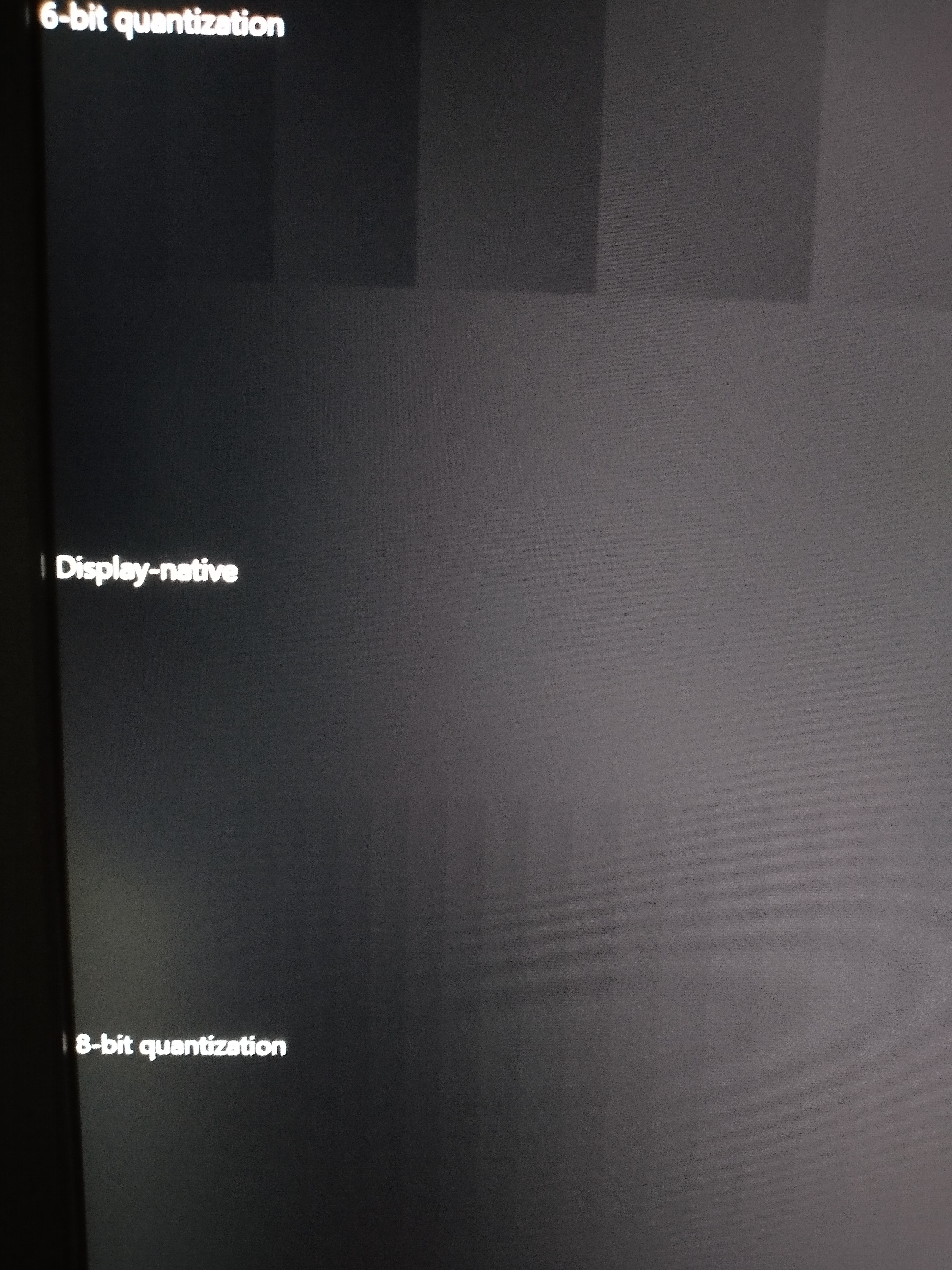
The 8-bit vs 10-bit aspect is entirely unrelated to the HDR vs SDR aspect.
10-bit is just added precision in your numbers, and ought to be interpreted as adding more decimal places (makes more sense when you imagine the values going from 0-1 instead of 0-255).
HDR is indicated as a bit somewhere in metadata to tell the downstream components how to interpret the pixel values.
To be extra pedantic, HDR is a bit to indicate how to interpret the brightness (luma) channel. There will be other bits for signaling how to interpret the color channels.
Often these things are all done together, which is generally referred to as HDR10.
I’m working on a website with WCG colors right now, and in practice you’re mostly right: Chrome and related browsers only support sRGB, and will thus only show sRGB colors. In Safari you can opt in to use display-p3 for colors in CSS, and it will display those as WCG and everything else still as sRGB. This looks amazing.
However, there’s Firefox which only supports sRGB, but then displays everything in WCG completely over saturating every single colored pixel on a website [1]. The only way to get your website to look the way you intended it on Firefox is to make the whole thing black and white.
Is there a way of mastering pictures for "real" HDR--not the fake compressed dynamic range crap, but with the right software switches to "turn on" the magic high dynamic range mode through the OS?
HDR video specifically has a metadata tag that allows the stream to be correctly viewed on your fancy TV by turning on all the right hardware and software "HDR switch"--like increasing max brightness to the set luminance value in the metadata, etc.
For HEIC pictures taken on iPhone, the right switches are turned on in iOS and macOS. Wondering if it's possible to create pictures from my regular sony a7r4 with those metadata tags so it can look cool on fancy displays.
I've literally asked everywhere including my workspace Slack (big company) and nobody knows. The only hack I know that works is making a freaking single-frame HDR video out of the picture file.
I think it's a big fat "it depends". For example, do GIFs even do HDR? And is there a 10-bits-per-channel specification for PNG's? (I haven't tried to look that up.)
Since HDR is a superset of the non-HDR color space, I suspect there will be not that much fuss converting 8-bit to 10-bit, but a whole lot of "magic" involved in converting 10-bit down to 8-bit.
So I’m not convinced this is actually “billions of colours”. Technically, it means having a 10-bit colour encoding over the wire such that you can express over a billion colours. The distinction between 8-bit and 10-bit is not actually sRGB vs HDR in the same way as dithering a GIF to a maximum of 256 colours lets you display the sRGB colour space but limits you to only 256 colours of it. https://helpx.adobe.com/photoshop-elements/using/dithering-w...
Similarly, you can turn on that little High Dynamic Range checkbox and get HDR but only have 16.7 million colours at your disposal because it’s output in 8-bits per colour rather than 10-bits per colour.
And it’s really hard to tell the difference sometimes between 8-bit HDR and 10-bit HDR. Like really hard. Like usually only visible when doing colour grading such that you need every possible nuance of data to more accurately shade and re-colour your pixels. https://youtu.be/MyaGXdnlD6M
Of course I imagine there’s also good vs bad dithering and the output to the attached laptop computer screen is probably better than the multiple cables and adapters required to output to TVs and external displays, but... the easiest way to tell whether something supports billions of colours is to go into monitor preferences and look for 10-bit or 422 or 444. If you see 420 or 8-bit, technically you might still have HDR but you don’t have “billions of colours”, technically.
Author here: I hear you. I had to double check a bunch of time whether you can get HDR with 8-bit displays. It seems like not all TV panels out there are 10-bit and they still claim to support HDR.
That's why I played the Spears and Munsil test pattern video with a 8-bit and 10-bit pattern on the same video. The 10-bit pattern was smooth which convinced me that it was outputting 10-bit signal. I also confirmed the TV and monitor I used has a 10-bit panel (not 8-bit + FRC).
> monitor preferences and look for 10-bit or 422 or 444. If you see 420 or 8-bit
I tried the monitor info but didn't find this information. Neither in the TV info. Also Apple hides this information in their System Report.
If you have other tests in mind, I'm happy to test more and get to the bottom of this :)
If you have an LG OLED TV you can push 11111 over the Channels > Channel Tuner menu (I think? Google this if it doesn’t work) and it will show you a screen of input stats. If you use the arrow keys and OK buttons you can open an HDMI sub-menu which shows you the input signal as 8-bit or 10-bit. Via a Club3D DP1.4 to HDMI 2.1 adapter I was only able to get 8-bit HDR according to the LG TV. Your other monitors might tell you more details maybe? I’m away from my setup but I could post a photo later and more details on the connections and cables. I tried 3 different USB C DisplayPort adapters with the same results on each... I plan to test what the LG TV says for an Nvidia 2060 soon too, to compare...
True HDR needs local dimming, so very few monitors outside of mini leds, oleds, and reference displays have large amounts local dimming, but it is coming to consumer displays.
Higher color depth enables new DRM possibilities, because the more colors there are, the better chance that data streams can be perceptibly-invisibly encoded on top of video.
I sure has hell can't tell the difference between an image with 16M colors and 16M^4 colors, so sometimes I think the above is the only reason why it exists or will be used when it's prevalent. But I'm older so maybe my vision simply isn't as good.
Don't know what Apple does, but as far as I know the HDR label in TVs is a bit like the USB bucket of blatant lies. They can call themselves HDR if hey accept the signal, they don't need to be able to display it correctly. So a 6 bit panel is allowed to call itself HDR if it can process the input somehow...
I believe the problem is indeed “HDR-compatibility” though having read the spec just now, no TVs appear to be truly HDR yet as defined by the ITU, they generally support the P3 colour space which is a subset of BT.2020. Citing Wikipedia for the statistics:
In coverage of the CIE 1931 color space, the Rec. 2020 color space covers 75.8%, the DCI-P3 digital cinema color space covers 53.6%, the Adobe RGB color space covers 52.1%, and the Rec. 709 color space covers 35.9%.
Technically DCI-P3 as used by projectors isn’t Display P3 as used by computers and smartphones but the numbers should give you an idea.
What you want to look for is high rating for “colour volume” such as https://www.rtings.com/tv/tests/picture-quality/color-volume... ... it varies based on LCD vs OLED. Even a fancy LG OLED might only be 87% of the DCI P3 colour space due to missing out on the brightest whites but absolutely nailing the darkest blacks in low light viewing.
One of my very first jobs I worked to test VGA cards. They were 4mb and 8mb. Yes you read that right, that is "m" as in megabytes. My setup was a 25 megahertz open case motherboard, a few of these. It was part of the last quality control station and I would pop each vga card into the PCI slot and boot it up.
I would basically run a macro which cycle through the resolutions from b/w, 4 colors, 16, 256, ... and up to a million or so. I think there is a name for this, but basically watching a prism of rainbow colors. At a million+ the color tones are very smooth and you don't see an outline.
I could not imagine I would be able to differentiate a billion colors from its previous factor. At that point, I would stamp it and it goes off to shipping for packaging, and to the customers.
> They were 4mb and 8mb. Yes you read that right, that is "m" as in megabytes.
mb is short for millibit, the abbreviation for megabyte is MB (or MiB if you mean 2^20 bytes). I know it's a minor thing, but "m" and "M" does not mean the same thing, neither does "b" and "B", and they're mixed up too often.
While we're being pedantic: I agree with you about SI prefixes, but bits are indivisible. A millibit doesnt exist (only possible use would be if one was referring to something like a transfer speed as "19 millibits per second", but that's kind of lacking meaning - "0.019 bit per second" or "1.14 bits per minute" would be better)
No, they're not. Sure, in more familiar scenarios where you're measuring the size of some amount of data it's an integer, but there's nothing mathematically wrong with having a not-integer number of bits.
If you do any sort of calculations with information theory you're quite likely to end up with a non-integer number of bits, and there's nothing wrong with that.
Sure, I accept I was wrong, and millibits may have some niche usage. That said, the comment I was responding to was describing hardware with "4 mb" of ram. There's no confusion in that case.
Mebibyte comes from pedants (like myself) that say that the Mega prefix in SI means 10^6, but in computing we often take it to mean 2^20. Mebibyte is unambiguous, and if everybody used it (unlikely. I don't think either MacOs or Windows use it), then Mega would also be. Right now, when you see mega in a computing context you're not sure if it means 10^6 or 2^20, although a lot of times it doesn't even matter.
Okay, this is second hand as I don't own a mac, but a friend who does noticed that on his macbook, macOS reports file sizes with megabyte being 10^6 bytes, whereas windows follos the 2^20 convention.
He was going crazy over a file being shown as 600Mb on Windows and 629Mb on mac. When he compared the bytes values, they were the same (around 629,145,600 bytes) and that settled it.
They changed the behavior of macOS a number of years ago (2012?) because disk manufacturers advertise storage capacity in 10^x, and the operating system displaying sizes in 2^y made the disks seem smaller and (in theory) caused confusion.
My MacBook Pro's internal "1 TB" disk is actually 1,000,240,963,584 bytes -- neither 1 TB nor 1 TiB.
> He was going crazy over a file being shown as 600Mb on Windows and 629Mb on mac. When he compared the bytes values, they were the same (around 629,145,600 bytes) and that settled it.
To be fair: It make sense to measure RAM in MiB, because it is addressed by binary address lines so you always end up with a power of two.
Files are, however, as big as somebody decided to write into them (modulo some rounding to the next sector, depending on file system implementation details). It does not make much sense to measure them in MiB. Quite often it just more confusing to calculate file sizes in MiB instead of MB. I dont even know why Microsoft stated that MiB business.
Similar with hard disks by the way. They contain as many sectors as the manufacturer was able to put on them. There is no power of two involved.
> I could not imagine I would be able to differentiate a billion colors from its previous factor.
Darker single color gradients exhibit very strongly noticeable color stairs. Tried to generate one for a background, locked horrible. It only looked good once I randomized the gradients a bit, i.e., even with 8 bit colors, you might need dithering.
Similar effects can be noticed in relatively dark photos of scenes with gradients, e.g., a sky.
Are you sure the panel you are viewing on is in fact also 8bits/color? The only time I have experienced what you are describing was when the panel turned out to be 6bpc - at the time I was working with raw data from a 12 bit sensor.
Thanks, that is very informative. Could you give a link to the source, or even the grey level range used here? I am trying to reproduce the results, but I an not having any luck unless I change my brightness/contrast to unacceptable levels.
That said, in person can be – depending on environmental lighting conditions – much more subtle. The test here was done with blinds closed in a mostly dark room.
In bright environments 8-bit is enough, and 6-bit with dithering can be close, but in dark environments (such as when watching a movie or gaming) you'll even notice banding in 10-bit content.
A rainbow is a rather bad test-case to distinguish color stops because it can vary two of the components at the same time. Monochromatic gradients make it easier to spot the quantization.
Additionally wider color gamuts also mean that each quantization step would cover a larger absolute difference if we kept things at 8bpc.
I don’t remember VGA doing millions of colors. I thought it did 256 colors, at best.
Wikipedia agrees with that (https://en.wikipedia.org/wiki/Video_Graphics_Array), but adds “The 640×480 16-color and 320×200 256-color modes had fully redefinable palettes, with each entry selected from an 18-bit (262,144-color) gamut.”. That, I don’t remember knowing, even reading that.
I was watching a guy on YouTube the other day talking about a computer he was building. He made reference to how he was keeping some component simple (the memory interface, I believe), which would compromise performance, but he wasn't worried about it because the 68000 he was using in it was so fast.
My first thought was "yeah, that makes sense" but my second was "what could it possibly mean when we talk about a 68000 being 'fast' in 2021?!"
It really made me think about how an attribute like "fastness" can get endowed and then still stick 40 years later, almost as though it were describing some spiritual attribute that transcends the fact that a modern $0.25 microcontroller is many times more performant.
Actually I exaggerated a bit, Matrox was peak 2D era. And yeah 3dfx voodoo 2 still had a massive glow in my brain. It represented so much magic and power in its day. It started the 3d ~high quality FPS... (riva128 and geforce3 followed).
Same goes for some symbols like 386 dx2. Our young brain were imprinted hard.
Think not about 4 times more hues, but about 4x the brightness range. Think about a 300 or 400 nit screen that shows you a scene with a bright sun but details in shadows still very discernible.
I asked the same question on starting a vfx job many years back. 8-bit, 256 colors for a feature film? Impossible, that would make it look like .gif or Windows95, right?
PCI graphics was standard around the time of Windows 3.11 and into Windows 95. Major difference in UI speed vs EISA graphics.
I used to work as a hardware technician in a local computer shop as a summer / weekend job back then. I installed dozens of 4mb Cirrus Logic PCI graphics cards when building PCs.
The motherboard multiple ISA and 1 PCI slot if I recall right. In fact I was testing VGA and also sound cards on the ISA slot. So checking sound and playing some mpeg video file.
I can maybe write up a short post about this if anyone would be interested more.
At home, away from work, I owned a mac which was running the power pc processor. And that was also 25 mhz. What I remember was how everything seemed integrated (e.g. not upgradable. Young me could not understand why there was no graphics card. I could only upgrade here the hard drive, or simm memory)
I hate to be a stickler for this but please say MB, not mb, when you mean megabytes. There are contexts where the distinction between m and M, or b and B, really matters!
VGA could not do truecolor; the original VGA at this resolution 640x480 could do 16 colors, i.e. 4 bits per pixel and that means 150 kB framebuffer. It could do 256 colors with lower resolution (oficially 320x200, or "mode-x" 320x240).
VGA came with 256 kB RAM onboard. Then, in the early 90's, SVGA came with 512 kB and 1 MB onboard, and it could do 800x600, 1024x768 and 1280x1024. The main RAM would be around 4 MB for the midrange computer. It took until mid-90, that you could get 4 or 8 MB SVGA, that could also do hicolor and truecolor.
CPU, 25 Mhz. This is when I learned to over clock the cpu to run at a higher speed, at risk of burning it. You simply moved a jumper on the board board and it would boot up at 33 Mhz, yahoo! My boss showed me this and I was able to test much faster, not having to wait so long during the boot sequence.
"Color" here is used as a broader term that includes black and white contrast and quantization noise, which certainly was a chief concern of early television design.
If we're going to be technical about the whole thing,
The history of colour television dates back to the mechanical era - with the first practical unit being demonstrated the same year as the first television station launched in America. Further, the first practical all-electronic colour television was developed in 1944, long before mass adoption of the technology. Finally, by the time television adoption began in earnest (1948), the FCC was developing a standard for colour television transmission.
So while it's true that for many years televisions displays lacked colour, they would have still been judged by their absence of colour by a population well aware of coming advancement.
So while it's true that for many years televisions displays lacked colour, they would have still been judged by their absence of colour by a population well aware of coming advancement.
Not even close. Black-and-white TV was the default for decades. Almost nobody judged televisions by their lack of color because hardly anyone beyond those who subscribed to Popular Mechanics even knew that color was a possibility.
The 1948 date is meaningless. Most American households didn't have a color TV until the very late 1960's, or even into the 1970's. TV stations didn't broadcast in color until the late 1960's, and even then most of the programs were in black and white. I remember when color TV broadcasts first became possible and the TV networks crowing before each color show "In color!" the way they did "In stereo (where available)!" in the 1990's.
When color TVs did become well-known and started becoming common, it was usually the parent's bedroom or the living room that had the big color TV, and all the remaining televisions in the house were back-and-white.
Personally, I didn't have a color TV until 1983, and that was only to use as a computer monitor.
Actually, yes, they did. This is why, for decades, photographers collected pieces of red, green, yellow, and blue glass, gel filters, and polarizers to put in front of or between their lenses, seeking ways to increase or mute contrast as desired. Ansel Adams' zone system of photography was all about understanding how to get colors into different zones of grey.
Actually, yeah! One example of this is the set of the Adams Family, which famously had a ton of pinks and bright pastels despite being a supposedly gothic set specifically because those colors created the best contrast in the final medium, a black and white tv set :)
Also this is confusing because I would expect it's not the chip that "supports" colours but the display. If you hook an M1 Mac Mini up to an old display that uses 8 bit colour you're not going to get "billions of colors"
If they are talking about the laptops, it should be that the Laptops/laptop displays supports billions of colors.
Well if you find the right model it should be possible, you should have cited something even earlier. The chip in a GTX 280 is capable of 10-bit output and displayport output, so that gets you at least 4K at 30 fps.
(I can't find an example model that had displayport, but I can find earlier models that did.)
Author here: I found this page after writing the blog but found it surprising that Apple has listed HDR support here but not on the actual product pages.
Yeah, Apple documentation isn't always so great. A month ago HT210980 still claimed that MacBook Air M1 can't play HDR on external displays [1]. It nice that they have now updated that document.
This isn't surprising, and isn't that big a deal. Most modern high-end laptops have HDR support and/or 10-bit output. Similarly, most modern CPUs and GPUs can accelerate 10-bit video decoding in hardware.
I don't think the author was trying to make a big deal out of it. They were just confirming something which wasn't clear from the product specs. Even though Apple doesn't list it, it has 10 bit color.
A couple of the newish Chromebooks have 10-bit HDR support now. So, even the bottom end is getting it now. The Samsung Galaxy 2 Chromebook has a retail of $549.
Fun fact: In human testing, subjects cannot tell the difference between 8-bit RGB and 10-bit RGB except for greyscale gradients.
(I wish I could link the study, but I found it during the peak of my 2012-era graphics career. Suffice to say, more devs should study the science of perceptual testing.)
I can see the difference in my 8-bit desktop background gradient, which is blue, and I don't think that's surprising at all since it's a brightness/value difference which is probably perceived through more cells (or more sensitively) in the eye. I can't link a study either but I'd like to have 10-bit even if it's just for the light axis.
Coincidentally in a YUV encoding I'd only push the V axis to 10 bit - maybe even 12 to cover extra HDR range, i.e. higher absolute brightness when the display supports it. (Or go with a logarithmic encoding, in which case even 8 bit might be enough...)
That wouldn't surprise me. If we couldn't tell them apart.
There must also be limits to perception or resolution. Are our eyes even able to tell the difference between FHD, 2K and 4K on a 15" screen?
I tested FHD vs 4K on a 31" screen and could not are a difference when watching a 10 minute video (I had 2 screens side by side for reference).
On a semi related note. I also tried watching 60fps videos at 60Hz vs 144Hz (again side by side) to test out my new screen. No difference. Even fast moving things.
I really feel like either I just don't perceive these things and it'll keep more money in my wallet, or that I'm not alone and everybody can save money. A chart of when differences actually become perceptible would be great. It wouldn't surprise me I'd the threshold for 4K were 42", 10bit only in grays and fps at a certain pixel per second movement speed.
If you measure this in a rigorous, scientific way, you will be forced to conclude that 8-bit RGB is enough.
The reasons why are interesting, but it has to do with how the eye processes images and color.
Remember, you can turn your screen as bright as you want. But it doesn't help the content appear more "real" or "better" or "HDR-like". Therefore, HDR is simply "the ability to discern between different levels of color." And if you try to measure exactly how many levels of color a human can discern, the answer is no more than the 256^3 available via 8-bit RGB.
The precise claim: if you have two screens next to each other, one 8-bit RGB and one 10-bit RGB, and both screens are color calibrated / brightness calibrated identically, and the viewing conditions are identical for both screens, then if you blindfold someone and put them in front of a random screen, they will be unable to say "Ah, this is the 10-bit RGB screen!" more than random chance.
No the dynamic range and wider color gamut is. Your argument is that 10-bit sRGB doesn’t give you anything over 8-bit sRGB, which I don’t agree with but it’s reasonable.
But that’s not what HDR is. 8bpc is definitely not enough to represent HDR Rec.2020 or DCI-P3 without significant banding.
Is this a high enough bit depth to eliminate the visual banding of gradients? If not, then what is? Because that would seem to be approximately the depth beyond which there would never be any benefit to further increasing it.
> Additionally, in saturated portions of the image (that is, where colors are pure and intense, such as a bright, pure red [rgba(255, 0, 0, 1)]), color depths below 10 bits per component (10-bit color) allow banding, where gradients cannot be represented without visible stepping of the colors.
Banding could also have been eliminated long ago by calculating gradients in higher bit depths and then dithering to 8bit. Sadly few graphics engines do this.
I found it surprising that if you have window space slightly smaller than this image, it will get scaled and get banding back on the dithered side, but only in Firefox. Chromium scaling doesn't have the same effect.
8 bit per channel is already enough to avoid banding. However, if you are editing content with 8 bits per channel its pretty easy to reach a situation when mixing colors or applying numerous effects will create banding. So ideally you convert to a much higher bit per channel or floating point. Then perform all editing in that that higher precision format and then once you have applied everything to the channel finally convert it back to 8 bit.
TLDR; If you display something and thats it, 8 bits is enough (generally). Start feeding it through mathematical functions you need more precision otherwise error compounds.
Without dithering 8bpc is not sufficient to avoid banding, especially on very shallow gradients or those covering large areas. The color steps may be subtle but the step-like way in which bands change is still visually distinguishable.
Gradients in photographs or video rarely have a perfect linear progression like you can generate in an image editor. (Sensor noise and other natural phenomena) There basically already is some natural dithering. If your software is not dithering extremely gradual gradients that's the problem.
Still in that case if you wanting to dither you gradient you better be working in a higher precision format.
Anyways, please notice I said: "8 bits is enough (generally)". There is a reason I said generally, I did not say always.
-Edit-
Although, lossy compression may effectively linearize gradients from video or photographs. Consider an extremely simple example: A compression algorithm that detects/fits to a gradual gradients to much smaller delta encoding. Such as increase the channel value by 1 every pixel for a 100 pixels. While this might be rather simple example. It's obvious to see how that would remove noise and make that section of an image highly linear.
For output of SDR content in a typical context on recent displays with small pixels (e.g. "retina" displays), a high-quality-dithered 8-bit image is visually indistinguishable from a dithered 12-bit image.
But for image editing, 16-bit integers or single-precision floats are certainly helpful.
And for HDR and wide-gamut images, 8 bits gets a bit limiting.
A little bit of Apple hagiography in there, claiming Apple is usually first. Discrete video cards have consistently been at the forefront of features like this, leading Apple by years. The difference is, the consumer must decide to build a system with these features. If I want an HDR system, I buy an HDR capable discrete card, HDR capable monitor, etc and put it all together.
What Apple does is assemble it all in a base model, like a console, so that all models have the feature set as base. And like other commenters have pointed out, PCs with HDR have been shipping long before, especially "workstation" machines.
Author here: I don't believe I'm claiming Apple is first to support HDR. I'm pointing out that Apple talked about a lot of things about M1 but not HDR or 10-bit output. Not even in their product pages. I test this out myself to see if it's actually supported.
Very strange. With an M1 MacBook Air, the Costa Rica video plays in Safari using rec.709 (non-HDR) and in Chrome with bt.2020 (HDR). Article uses an M1 Mac mini connected to external monitors so it's a different test but it showed Safari playing bt.2020 (doesn't say anything about Chrome).
Seems like it will take time for this all to shake out.
I just got a 16GB M1 MBP, and I can see the HDR option in Youtube even on the inbuilt display. Didn't know that the inbuilt display supported HDR too. I thought HDR was going to be reserved for the future mini-LED displays.
A lot of newer MacBooks display HDR via macOS's EDR. This doesn't suddenly increase the bit depth of the display, but does allow the video to increase its peak brightness values beyond that which the user has set.
This is done by physically increasing the backlight brightness and dimming the LCD around the video content to keep UI brightness levels consistent. The UI bit depth actually decreases once EDR kicks in.
Industry is going to have to get their nomenclature straightened out because nobody really knows what's going on in consumer land. HD was something people understood - 4K maybe. Beyond that, not so much.
What other posts is it competing with? Right now all the other posts at the top of the front page are older and many of them have similar amounts of comments and points. It seems that HN just isn’t very active right now.
Does anyone know how the ranking algorithm on this site works?
If not, I'm going to block it from my network. I don't care for another opaque algorithm controlling my information. It's not like I'd miss out on much intelligent discussion...
> The basic algorithm divides points by a power of the time since a story was submitted. Comments in threads are ranked the same way.
> Other factors affecting rank include user flags, anti-abuse software, software which demotes overheated discussions, account or site weighting, and moderator action.



Actually color in the history of Apple stems from Woz not Jobs, who added color to Apple II. Jobs in fact reverted to black and white in Macintosh/original NeXT and spent the compute/memory resources on other things (e.g. higher res).